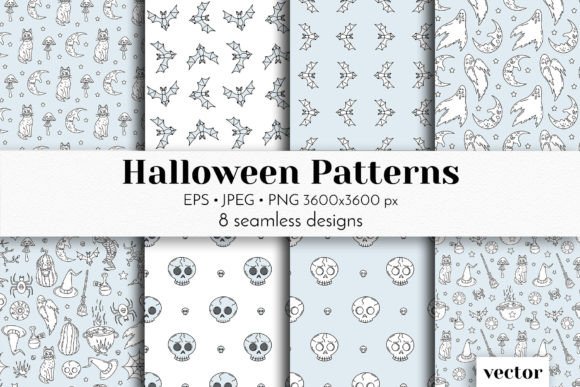
6 Halloween Patterns: Seamless Vector Designs for Real-World Creative Workflows
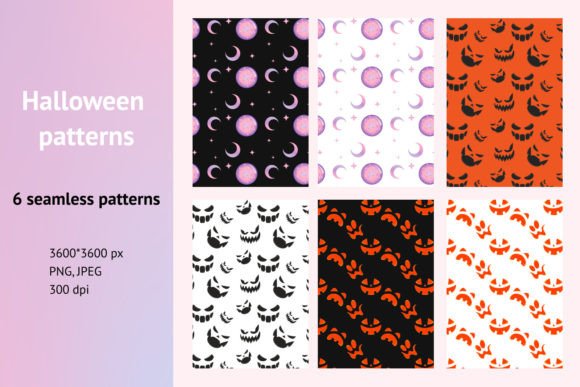
When you’re designing a seasonal product line, launching a themed marketing campaign, or preparing classroom materials for October, timing matters—and so does asset reliability. 6 Halloween Patterns is a digital paper pack built for execution, not just inspiration. It delivers six cohesive, high-resolution seamless vector patterns—each 12″ × 12″ (3600 × 3600px) at 300 dpi—in both JPEG and PNG formats. These aren’t decorative afterthoughts. They’re production-ready assets designed to integrate directly into your existing tools, timelines, and output requirements.
Where These Patterns Fit in Your Workflow
Unlike single-use clipart or low-res web graphics, 6 Halloween Patterns functions as infrastructure. Think of it like stocking a well-organized supply cabinet: you acquire it before the rush begins—not because you need all six immediately, but because you know which ones will anchor specific deliverables. For example:
- A small-batch stationery seller uses one pattern for printable gift tags, another for the interior lining of custom Halloween gift bags, and a third as a subtle background on Instagram Story templates—all pulled from the same consistent palette and scale.
- An educator building a literacy unit on autumn folklore imports two patterns into Canva to create differentiated reading worksheets—PNG transparency allows clean layering over text boxes without manual masking.
- A freelance packaging designer applies one pattern as a repeat swatch in Adobe Illustrator for a limited-edition candy box, then reuses the same file in InDesign for the accompanying product catalog layout—no rescaling, no quality loss, no version confusion.
This isn’t about adding more files to your desktop. It’s about reducing decision fatigue when consistency matters most.
Compatibility and Integration Across Tools
The dual-format delivery—six JPEGs and six PNGs—means these patterns adapt to how you actually work. JPEGs load quickly in web-based tools like Cricut Design Space or Canva and render reliably in email clients or CMS editors where transparency isn’t supported. PNGs preserve alpha channels, making them ideal for layered mockups in Photoshop, precise cut-file prep for vinyl or fabric printing, or overlaying onto photos in Lightroom or Snapseed.
All files are sized to industry standards: 12″ × 12″ at 300 dpi ensures crisp output whether you’re printing scrapbook paper at home on an Epson ET-8500 or sending files to a commercial printer for retail-ready packaging. No upscaling, no interpolation artifacts, no last-minute panic over pixelation.
Because they’re seamless, each pattern tiles perfectly—no visible seams, no alignment guesswork. That means faster setup in Illustrator’s Pattern Options panel, smoother application in Procreate’s Fill tool, and reliable repetition in Figma auto-layout frames. You don’t need advanced vector skills to use them; you just need to know where your software expects repeatable textures.
For Small Business Owners & Product Creators
Batch your prep. Import all six patterns into your design library before inventory planning begins. Assign each one a clear use case—e.g., “Pattern 3 = gift wrap + tote bag lining,” “Pattern 5 = blog header + printable planner pages.” This prevents duplication and keeps branding tight across physical and digital touchpoints. Store filenames with descriptive tags (e.g., 6-Halloween-Patterns_Pumpkin-Silhouette_JPEG.jpg) so they surface instantly during search—no scrolling through generic “halloween1.jpg” files.
For Educators & Content Creators
Leverage the PNGs’ transparency for accessibility. Overlay a light-patterned background behind dark text to improve readability without sacrificing theme. Use one pattern consistently across handouts, slide decks, and digital exit tickets—students recognize visual continuity as part of your instructional rhythm. Because all six share proportion and density, switching between them maintains cognitive flow without jarring contrast shifts.
For Freelancers & Designers
Build these into your asset handoff package. When delivering branded assets to a client, include the relevant pattern(s) alongside color palettes and typography guidelines. It signals attention to print-and-digital cohesion—and saves clients from sourcing mismatched elements later. Also: rename files before embedding in shared cloud folders (e.g., “ClientName_Halloween-Wrap-Pattern.png”) to avoid accidental reuse across unrelated projects.
Quality Control and Long-Term Usability
These aren’t generated by AI or upscaled from smaller originals. Each pattern was constructed as a vector-first design, then rasterized cleanly at full resolution. That means no blurring at edges, no compression artifacts in shadow areas, and no hidden metadata that interferes with CMS uploads or print RIP processing.
Test them early in your pipeline. Drop one into your standard print template and run a proof on your target stock—coated vs. uncoated, matte vs. glossy—to confirm how halftone interaction affects texture perception. Likewise, preview PNGs on multiple devices: some mobile browsers compress transparency aggressively, so verify legibility on iOS and Android before finalizing social posts.
Organize them systematically. Create a dedicated folder named Seasonal_Assets/Halloween/2024_Patterns, not Downloads or Stuff. Add a simple README.txt listing each filename, its dominant motif (e.g., “bats + cobwebs”), and recommended use cases. This pays off next year—when you’re prepping for 2025, you’ll know exactly which pattern worked best for mailer backgrounds versus embroidery digitizing.
How Preparation Changes Outcomes
Using 6 Halloween Patterns isn’t about decoration—it’s about reducing friction in execution. Consider the difference between:
- Starting from scratch: Searching for “free Halloween background,” downloading three options, resizing each, adjusting contrast, testing tiling, realizing one doesn’t align, restarting.
- Working from prepared assets: Opening Pattern 2, dragging into Illustrator, applying as a swatch, exporting for print—under two minutes.
That time savings compounds. Five minutes saved per project × twelve seasonal assets × three months of campaign work = over three hours reclaimed. More importantly, it preserves creative bandwidth for decisions that matter: messaging strategy, audience targeting, material sustainability, or student engagement tactics.
It also improves consistency across teams. If your marketing coordinator, graphic designer, and fulfillment lead all pull from the same verified set, there’s no drift in tone or texture between the website banner, the in-store poster, and the shipping label sticker. That uniformity builds recognition—and trust.
Real Integration, Not Just Decoration
Halloween-themed work often gets siloed as “seasonal” or “fun”—but for professionals managing real deadlines and real budgets, it’s part of a disciplined output cycle. 6 Halloween Patterns supports that discipline. It’s not a shortcut. It’s a precision tool: calibrated for scale, tested for compatibility, structured for reuse.
You don’t need to use all six at once. You might deploy only two for a focused launch—say, a podcast merch drop and accompanying email series—then rotate in two others for a holiday workshop kit. The value isn’t in volume; it’s in having vetted, interoperable options ready when workflow demands speed and fidelity.
And because they’re digital-only, there’s no shelf space to manage, no shipping delays, no inventory tracking. You download, organize, apply—and move forward.